Drivers and tours
Who is out, with which orders and with how much cash? The driver area answers exactly these three questions.
1. Creating drivers
Drivers are staff members with the role Driver (back office → Staff). Admins and managers may deliver as well, and so may staff members who have Driver view ticked under iOS app. On the staff record you also store:
- the Hourly wage (€) for the wage calculation,
- Travel pay (role Driver only) as a model: None, Driver keeps delivery fee, Flat rate per trip with Amount per trip (€), Mileage with Amount per km (€) or Flat rate per district (delivery zone) – the “driver fee” from the delivery zones.
2. Starting a tour
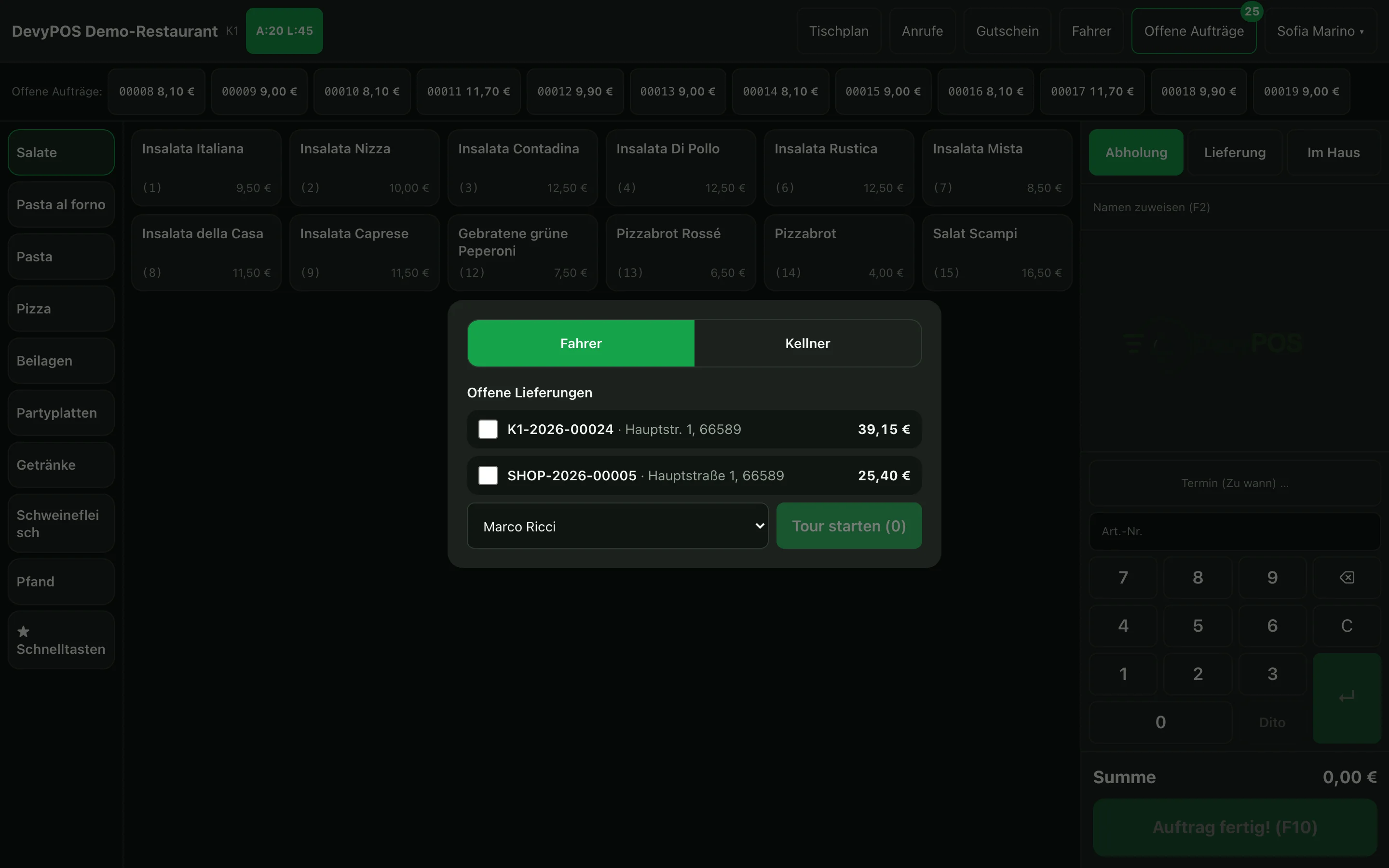
- Open Drivers in the header; the area has the tabs Drivers, Settlement and Staff sale, and the tour is built in the Drivers tab. Under Open deliveries you find every delivery order not yet assigned to a tour – including those still being prepared.
- Tap the orders that will be driven together.
- Choose the driver in the selection field, then Start tour – the driver appears under On the road with the number of stops and the total. A started tour cannot be taken back; it ends only with Book settlement.
Orders already paid online are marked as paid: the driver does not have to collect any money for them.
3. Settling
When the driver returns, Settle next to their tour – or in the Settlement tab: choose the driver on the left, Settle tour – opens the Driver settlement. For each order you set with Cash or EC how the driver collected the money; orders paid in advance only show paid:
- Cash expected – what they have to hand in: the orders collected in cash less wage and travel pay (Employee receives).
- Handed over (€) – what they actually hand in; if it differs, the form shows the Difference.
- Wage calculation – Work from / to: DevyPOS turns it into decimal hours and multiplies it by the hourly wage.
- Travel pay – the model stored on the staff record is preset and can be changed per tour: None, Driver keeps delivery fee, Flat rate per trip (number of trips, otherwise the stops), Mileage (km) or Flat rate per district (delivery zone).
At the end you see whether the employee has to pay something in or receives something. Book settlement charges every order with the chosen payment method, books the cash handed over as a deposit into the cash book and prints the settlement receipt – with a signature line for the driver.